Apple Adds New App Store Creative Assets for iOS 27: Product Page Headers and Search Results
Apple is adding new image and video placements to App Store product pages and search results. Here is what app marketers should prepare before iOS 27 rolls out
Apple is changing one of the most important parts of App Store marketing: what people actually see before they decide to download your app.
With iOS 27 and iPadOS 27, Apple is introducing new Creative Assets that can appear in two extremely valuable places:
- The Product Page Header at the top of your App Store product page.
- A new Search Results Creative Asset shown when people discover your app through App Store search.
These are not just another set of screenshots.
They give developers and app marketers more freedom to use images and videos that communicate the brand, a seasonal campaign, a major feature, new content, or the core reason someone should care about the app.
And if you work on ASO or Apple Ads, this deserves attention now.
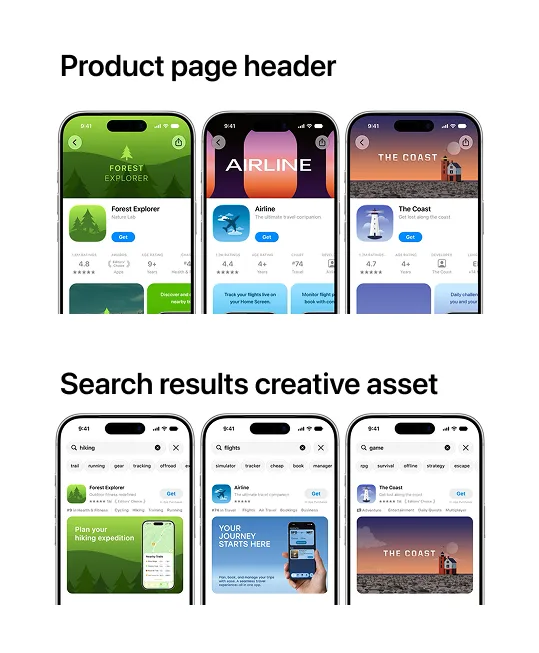
What Apple Is Changing in the App Store
Until now, most App Store creative optimization has revolved around the app icon, screenshots, app previews, In-App Events, and Custom Product Pages.
Apple is expanding that creative surface.
According to Apple's new App Store asset guidance, Creative Assets can appear across the App Store on iOS 27 and iPadOS 27 and later, including product pages, search results, featured placements, Custom Product Pages, Product Page Optimization tests, and Apple Ads use cases.
The two placements that matter most for acquisition are the Product Page Header and Search Results.
The simple version is this:
| Placement | What it does | Why marketers should care |
|---|---|---|
| Product Page Header | Adds an image or video at the top of the App Store product page | Changes the first impression before users reach your screenshots |
| Search Results Creative Asset | Adds a custom visual when your app appears in App Store search | Gives you a new way to earn attention before the user even opens the product page |
This creates a new creative layer on top of traditional ASO.
Keywords still matter. Ratings still matter. Screenshots still matter. Your icon still matters.
But the amount of visual real estate available to influence the install decision is increasing.
Product Page Headers Are New Conversion Real Estate
The Product Page Header is the first visual someone can see when they land on your app's product page.
Apple says developers can use an image or video to express the app's brand, highlight seasonal offers, show new content, or otherwise set the tone for the product page.
That matters because the top of your product page has always been disproportionately important.
A user does not carefully study every screenshot before making a decision. They build an impression quickly.
If your new Product Page Header makes the app look more relevant, more polished, or more desirable than the alternatives, the rest of the page starts from a stronger position.
Apple's own guidance is simple: keep the header focused on one clear idea and design it for someone seeing the app for the first time.
That is good advice.
The temptation will be to turn the new header into a billboard packed with five features, three badges, two slogans, and a CTA.
Don't.
The job of the header is not to explain everything. It is to make the user want to keep looking.
I wrote a separate guide focused entirely on the new App Store Product Page Header, including how I would approach the creative strategy and testing.
Search Results Are About to Become More Competitive
The Search Results Creative Asset may be even more important for ASO.
Why?
Because this asset can influence the user before they reach your product page.
Apple describes the search result asset as the first thing people can experience when they find your app or game through the Search tab.
That makes it part of the battle for the tap.
A person searching for "workout tracker," "photo vault," "AI photo editor," or "DMV test" is already comparing options. Every visible app is competing for attention in the same screen.
If one app uses the new creative placement to communicate exactly what the searcher wants while another relies on generic screenshots, the first app may have a much easier time earning the product-page visit.
Apple recommends making the app's purpose obvious at a glance and showing the actual interface, content, or gameplay where appropriate.
That aligns perfectly with ASO fundamentals: match the creative to search intent.
If you do not provide a Search Results Creative Asset, Apple says your In-App Events, app previews, and screenshots can appear instead.
So your listing will not become blank.
But "Apple will fall back to my screenshots" is not a strategy.
If your competitors are intentionally designing for the new search placement and you are not, they get one more chance to communicate value before the click.
I have a dedicated article on App Store Search Results Creative Assets and how I would use them for ASO and paid acquisition.
Will These New Creative Assets Improve App Store Rankings?
This is where I would be careful with the usual ASO hype.
Apple has not said that uploading a Product Page Header or Search Results Creative Asset directly boosts your keyword rankings.
So I would not tell a client, "Upload this asset and Apple will rank you higher."
That is not what Apple announced.
The more interesting effect is indirect.
ASO is not only about being indexed for a keyword. It is also about turning visibility into taps and installs.
If a new search creative improves the percentage of people who choose your app from the results, or a new header improves the percentage of product-page visitors who download, you are extracting more value from the same visibility.
That is why I see these Creative Assets as a conversion-rate optimization layer inside ASO.
Your competitors do not need a mysterious algorithmic ranking boost to hurt you.
They only need to look more relevant than you when the user is deciding what to tap.
This Also Changes Apple Ads Creative Strategy
This update is not limited to organic App Store traffic.
Apple says Creative Assets can also be used with Apple Ads, including ads in search results and the Today tab.
That is important because Apple Ads creative has historically been much more constrained than platforms such as Meta Ads.
Apple is moving toward giving advertisers more control over what users see.
For app marketers, that creates a much tighter relationship between:
- ASO creative strategy.
- Organic App Store search.
- Custom Product Pages.
- Product Page Optimization.
- Apple Ads campaigns.
You can start thinking about the App Store less like one static listing and more like a set of acquisition surfaces that should share the same message.
If a user searches "private photo vault," for example, the strongest setup is not just bidding on the keyword.
The search creative should communicate privacy immediately. The product page header should reinforce the same promise. The screenshots should prove it. The Custom Product Page used by the campaign should continue the same story.
That is how paid and organic App Store marketing should work together.
For more on that side of the funnel, read my Apple Search Ads best practices guide. Apple renamed Apple Search Ads to Apple Ads in 2025, but many marketers still use the ASA name when talking about search campaigns.
Apple Is Also Launching a New Asset Library
The Creative Assets are part of a bigger App Store Connect update.
Apple is introducing an Asset Library, a centralized place to manage images, videos, screenshots, app previews, In-App Event media, and the new marketing Creative Assets.
This is more useful than it sounds.
Apple says developers will be able to submit assets for review independently of an app update and reuse approved assets across different App Store marketing placements.
That should make seasonal marketing much easier.
Imagine a fitness app preparing a New Year's campaign or a game preparing a major season launch. Instead of tying every visual change to a binary update, the team can prepare creative assets, get them reviewed, and reuse them where appropriate.
The Asset Library also connects to Apple's new product page preview tools, so teams can check how the creative looks across devices, orientations, languages, and appearance modes before publishing.
Apple Says the New App Store Creative Assets Are Coming This Fall
As of August 7, 2026, Apple's "What's New in App Store" page says these new marketing capabilities are coming this fall.
That means the right move is not to wait until every competitor has already launched them.
Start preparing the concepts now.
At minimum, I would have these ready:
- One strong brand-led Product Page Header concept.
- One benefit-led Product Page Header concept.
- One Search Results asset built around the app's clearest category use case.
- Search-specific variations for your most valuable intent clusters.
- Localized versions for major markets where the message changes.
- A testing plan for Product Page Optimization instead of treating the first upload as permanent.
Apple has also published Figma, Photoshop, and Pixelmator templates from its App Store asset best-practices page, so design teams can begin working from Apple's own specifications rather than guessing.
How I Would Prepare an App for iOS 27
If I were preparing an app listing for this rollout, I would not begin in Figma.
I would begin with search intent.
First, identify the three to five reasons people are most likely to download the app.
For a strength-training app, that could be:
- Get stronger.
- Follow a simple workout plan.
- Track progress.
- Stop guessing what to do in the gym.
For a photo privacy app:
- Hide private photos.
- Lock personal media.
- Keep sensitive photos away from other people using the phone.
Then map those motivations to your highest-value organic and Apple Ads queries.
Only after that would I create the assets.
The mistake will be treating these new placements like a branding exercise disconnected from acquisition.
The opportunity is the opposite.
Use the new visuals to make the promise behind the keyword obvious.
The Apps That Move First Will Learn First
I do not think every app that uploads a Product Page Header on day one will suddenly dominate the App Store.
But teams that start testing early will have something more valuable than novelty: data.
They will learn which visual angle improves conversion.
They will learn whether a brand-led header beats a product-led one.
They will learn whether Search Results assets should be direct and functional or more aspirational.
They will learn how organic search creative and Apple Ads creative should differ.
Meanwhile, teams that ignore the new placements will still be arguing about screenshot number four.
That is the real competitive risk.
App Store optimization is getting more creative, not less.
If your app depends on App Store discovery, start preparing for iOS 27 now.
Sources
Free starter guide
Ship your first Apple Ads campaign in 2 hours.
Most guides make Apple Search Ads sound like a project. It's not. This is the exact setup I use with every new client: campaign structure, keyword match types, starting budget. Two hours, start to finish, no agency jargon.
One email. Unsubscribe anytime.
Keep reading
Apple Maps Ads: What Marketers Need to Know
Learn how Apple Maps Ads work, where they appear, how businesses can use them, and why search intent makes this advertising channel worth understanding
How to Advertise on Apple Maps: Complete Apple Maps Ads Guide
A practical guide to setting up Apple Maps Ads, choosing locations, adding creative, setting a budget, and preparing your Apple Business listing before you spend money
App Store Search Results Creative Asset: How to Win More Installs in iOS 27
Apple is adding custom image and video assets to App Store search results. Here is why this matters for ASO, Apple Ads, and competing for high-intent searches
App Store Product Page Header: How to Use Apple's New iOS 27 Creative Asset
The new App Store Product Page Header gives apps a major image or video placement above the rest of the listing. Here is how to use it for ASO, conversion and Apple Ads