App Store Search Results Creative Asset: How to Win More Installs in iOS 27
Apple is adding custom image and video assets to App Store search results. Here is why this matters for ASO, Apple Ads, and competing for high-intent searches
App Store search is about to get more visual.
With iOS 27 and iPadOS 27, Apple is introducing a new Search Results Creative Asset that lets developers use custom images or videos when their app appears in App Store search.
This matters because search is not just where apps get discovered.
It is where apps get compared.
A user types something specific, sees multiple alternatives, and decides which one deserves the tap.
Now developers get another creative surface to influence that decision.
If your ASO strategy stops at keywords and screenshots, this is the update to pay attention to.
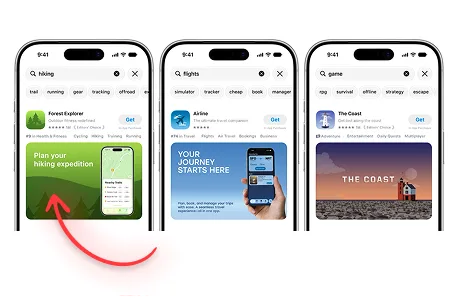
What Is the App Store Search Results Creative Asset?
The Search Results Creative Asset is a new type of App Store marketing visual designed specifically for the search-results experience.
Apple says it is the first thing people can experience when they find your app or game through the Search tab, before they reach your product page.
The asset can use richer imagery or video beyond the traditional screenshot sequence.
Apple's guidance focuses on two ideas:
- Make the app's purpose obvious at a glance.
- Show the firsthand experience, such as the interface, content, or gameplay.
That tells you exactly how Apple expects this placement to work.
Search users are high intent.
Do not make them decode your brand campaign.
Show them why your app matches what they searched for.
Why This Is a Big ASO Change
Traditional ASO has two separate jobs:
- Get discovered.
- Convert discovery into an install.
Most keyword work happens in the first job.
Creative optimization happens in the second.
The new Search Results Creative Asset pushes conversion optimization earlier in the funnel.
The user no longer has to open your product page before a custom marketing visual can influence them.
That means App Store search results themselves become a more serious creative battleground.
Imagine four apps ranking for "AI headshot."
They all have reasonable ratings. Their names are understandable. Their icons are fine.
One app uses a Search Results asset that instantly shows a boring selfie becoming a polished professional headshot.
The others show generic screenshot panels.
Which one feels most relevant?
That is the advantage Apple is creating.
Your Competitors Do Not Need to Outrank You to Beat You
This is an important distinction.
Apple has not said that uploading a Search Results Creative Asset directly improves keyword rankings.
So this is not a secret "rank higher" metadata field.
But rankings are not the only way a competitor can take installs from you.
A competitor can rank below you and still earn the tap if its result communicates value better.
That is why I would frame this update as a threat to apps with lazy ASO creative.
If two listings are visible for the same query and one makes the user's desired outcome obvious while the other looks generic, the generic listing is relying on position alone.
That is fragile.
The better creative may not outrank you algorithmically.
It can outcompete you visually.
For most app businesses, that distinction does not make the lost install feel any better.
What Happens If You Do Not Add a Search Results Asset?
Apple says that if you choose not to use a Search Results Creative Asset, your other eligible App Store media can appear instead, including:
- In-App Events.
- App previews.
- Screenshots.
So the new asset is not mandatory in the sense that your listing disappears without it.
But that does not mean ignoring it is neutral.
Fallback content was created for other parts of the product experience.
A purpose-built search asset can be designed for the specific job of winning attention from someone who has just typed a query.
That is a better starting point.
Design the Asset Around Search Intent
The biggest mistake will be creating one beautiful generic asset and using it for every search context.
Search is specific.
Your creative should be specific too.
If someone searches "photo vault," privacy should be obvious.
If they search "hide photos," secrecy and control may matter more.
If they search "private gallery," organization plus privacy could be the stronger angle.
Those keywords are related, but they are not identical motivations.
This is the same principle I use in Apple Search Ads best practices: map the query to the user's real intent, then make the message match it.
The new Search Results asset gives you another place to execute that strategy.
Show the Product, Not Marketing Fog
Apple specifically recommends showcasing the firsthand experience.
That is important.
Search users usually want to make a fast decision.
If they searched for a workout tracker, show tracking.
If they searched for a flight tracker, show the flight experience.
If they searched for a language-learning game, show the learning or gameplay loop.
Do not use vague lifestyle photography when the product itself is the proof.
There are exceptions, especially for strong brands and entertainment products, but the default should be clarity.
A useful internal test is:
Could someone understand why this app belongs in this search result without reading the description?
If the answer is no, the asset is probably too clever.
Search Results Creative Assets and Apple Ads
This update also matters for paid acquisition.
Apple says developers will be able to use Creative Assets with Apple Ads, including search-results campaigns.
That is a major direction change for a platform that historically gave marketers much less creative control than Meta or TikTok.
The new workflow gives you more opportunity to align:
- The keyword.
- The ad creative.
- The search result.
- The Custom Product Page.
- The Product Page Header.
- The screenshots.
That is the full acquisition journey.
If you bid on a high-value keyword and then send the user through a generic visual experience, you are wasting intent.
The new Creative Assets make message matching more important because Apple is giving you more places to control it.
Organic ASO and Paid Apple Ads Are Moving Closer Together
This is one of the bigger strategic implications.
Organic ASO and paid Apple Ads used to feel like related but separate disciplines.
The new asset system makes them overlap more.
The same creative library can support product-page experiences, search discovery, Custom Product Pages, Product Page Optimization, and paid Apple Ads placements.
That means creative learnings can move between channels faster.
If an Apple Ads search creative works extremely well for a certain intent cluster, that insight may influence your organic search creative.
If Product Page Optimization reveals that one value proposition consistently improves conversion, that should influence which angle you use in paid search.
This is how mature app marketing should work.
Do not let ASO and paid acquisition teams optimize different stories for the same user.
Can You Use the Same Asset for Search Results and the Product Page Header?
Yes.
Apple says developers can use a universal creative asset across the Product Page Header and Search Results placement.
This can make the experience feel consistent and simplify production.
A user sees a recognizable visual in search and then sees the same concept after tapping through.
That continuity can strengthen recognition.
But I would still test whether each placement deserves its own creative.
Search needs speed and clarity.
The product page can sometimes support a broader brand or emotional story.
One universal asset is operationally simple.
Two purpose-built assets may convert better.
The answer should come from testing, not convenience.
For the header side, see my separate App Store Product Page Header guide.
How I Would Build Search Result Assets
I would not start by asking, "What should the image look like?"
I would ask, "What are our most valuable search intents?"
Then build from there.
A simple process:
Step 1: Identify high-value search themes
Use organic keyword data, Apple Ads search terms, category research, and competitor analysis.
Do not only chase the highest-volume keywords. Prioritize terms where your product has a strong reason to win.
Step 2: Write one promise per intent cluster
Examples:
Workout app
- "Track every lift" for tracker intent.
- "Get stronger with a plan" for strength-program intent.
- "Know exactly what to do today" for workout-plan intent.
Photo app
- "Turn selfies into professional headshots" for AI headshot intent.
- "Remove any background in seconds" for background-removal intent.
- "Fix blurry photos" for enhancement intent.
Step 3: Make the proof visual
Show the UI, result, content, or gameplay that proves the promise.
Search creative should reduce uncertainty.
Step 4: Keep the focal point obvious
Apple warns that assets can appear differently across App Store surfaces and devices. Keep critical content readable and inside safe areas.
Step 5: Localize the message
Translate only when translation is enough.
If the user motivation changes by market, localize the concept too.
What I Would Measure
The new placement should not become a vanity design project.
Measure whether it helps the acquisition funnel.
Depending on the reporting Apple exposes for the placement and the traffic source, I would care about:
- Search-result engagement.
- Product-page views.
- Product-page conversion rate.
- Install conversion.
- Apple Ads tap-through rate.
- Apple Ads conversion rate.
- Cost per acquisition.
- Downstream user quality.
The last point matters.
A flashy creative that gets more taps but attracts the wrong user can make the top of the funnel look better while the business gets worse.
The goal is not maximum curiosity.
The goal is qualified installs.
App Store Search Is Becoming a Creative Auction Too
Not literally in the organic ranking sense.
But strategically, yes.
Every visible app competes for finite attention.
When Apple gives developers richer visuals in search results, creative quality becomes a bigger part of that competition.
The apps that understand their users will benefit most.
Not the apps with the most decorative design.
The apps that can look at a query and immediately show the user, "Yes, this is the thing you were searching for."
That is what strong ASO creative does.
Prepare Now for the iOS 27 Rollout
Apple currently says the new App Store marketing features are coming this fall.
As of August 7, 2026, I would already be preparing assets for the most important search-intent groups.
Do not wait for launch day to begin debating the message.
Create the concepts now. Use Apple's official templates. Decide how paid and organic teams will share creative learnings. Prepare localized versions. Build a hypothesis for every asset.
When the placement becomes broadly available, you want to test—not start brainstorming.
For the complete overview of the update, read Apple Adds New App Store Creative Assets for iOS 27.
The Takeaway
The new App Store Search Results Creative Asset creates another conversion decision before the product page.
That makes it an ASO feature, an Apple Ads feature, and a creative strategy feature at the same time.
No, Apple has not said it directly increases keyword rankings.
It may not need to.
If your competitor can make its app look more relevant in the exact moment a high-intent user is choosing what to tap, that competitor has an advantage.
The answer is not to stuff more keywords into your metadata.
The answer is to make your value obvious faster.
Sources
Free starter guide
Ship your first Apple Ads campaign in 2 hours.
Most guides make Apple Search Ads sound like a project. It's not. This is the exact setup I use with every new client: campaign structure, keyword match types, starting budget. Two hours, start to finish, no agency jargon.
One email. Unsubscribe anytime.
Keep reading
Apple Maps Ads: What Marketers Need to Know
Learn how Apple Maps Ads work, where they appear, how businesses can use them, and why search intent makes this advertising channel worth understanding
How to Advertise on Apple Maps: Complete Apple Maps Ads Guide
A practical guide to setting up Apple Maps Ads, choosing locations, adding creative, setting a budget, and preparing your Apple Business listing before you spend money
Apple Adds New App Store Creative Assets for iOS 27: Product Page Headers and Search Results
Apple is adding new image and video placements to App Store product pages and search results. Here is what app marketers should prepare before iOS 27 rolls out
App Store Product Page Header: How to Use Apple's New iOS 27 Creative Asset
The new App Store Product Page Header gives apps a major image or video placement above the rest of the listing. Here is how to use it for ASO, conversion and Apple Ads