How to Advertise on Apple Maps: Complete Apple Maps Ads Guide
A practical guide to setting up Apple Maps Ads, choosing locations, adding creative, setting a budget, and preparing your Apple Business listing before you spend money
Businesses can advertise inside Apple Maps through Apple Maps Ads.
For local businesses, this creates a paid acquisition channel at a very interesting point in the funnel: when someone is actively deciding where to go.
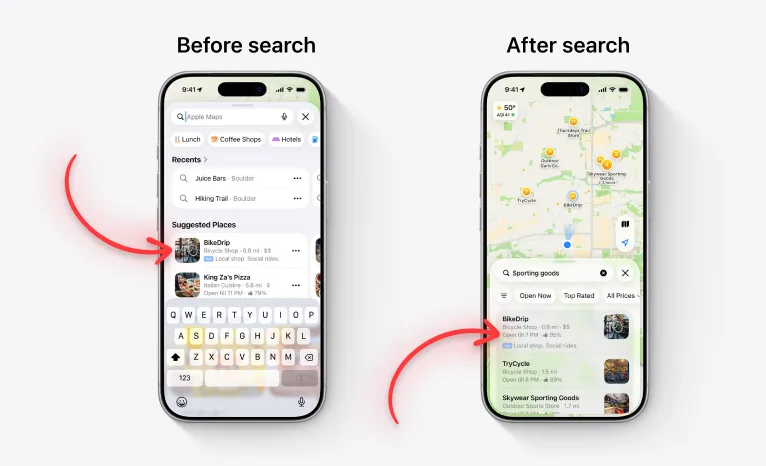
Apple Maps Ads can appear before a user searches and inside relevant search results after they search.
If you want to test the channel, the setup is not complicated. But there is a big difference between launching a campaign and launching one that has a chance of working.
This guide covers both.
Can you advertise on Apple Maps?
Yes.
Apple Maps Ads allow eligible businesses in supported markets to promote physical locations through Apple's advertising and business tools. Availability can vary by market, so check Apple's current eligibility information before setting up a campaign.
The ads promote physical business locations rather than apps.
So if you are familiar with Apple Ads because you run App Store campaigns, do not confuse the two products.
App Store ads are designed to generate app discovery and downloads.
Apple Maps Ads are designed to help people discover and take action on nearby businesses.
Where do Apple Maps Ads appear?
Apple Maps Ads include two main placements.
Suggested Places ads
Ads can appear in the Suggested Places area before somebody begins a specific search.
This placement is closer to discovery.
You are reaching someone who is exploring Maps but has not necessarily expressed a precise search intent yet.
Apple Maps search results ads
Ads can also appear after somebody searches for a relevant business or category.
For example, someone might search for:
- Italian restaurant
- gym
- coffee shop
- sporting goods
- hotel
- pharmacy
A relevant promoted business can then appear in the search results.
From a performance marketing perspective, this is the placement I would watch most closely.
Why?
Because the user has already told you what they want.
That is the same reason App Store search campaigns can be so powerful for app acquisition. Search removes a lot of guessing.
Step 1: Set up Apple Business
Before you can advertise on Apple Maps, you need an Apple Business organization.
Apple Business is where business owners can manage how their company and locations appear across Apple services, including Maps.
Start by creating your organization and completing the required company information.
You will also need to verify the organization and claim the business locations you want to manage.
Apple's current Apple Maps advertising setup guide walks through the process.
Do not treat this as admin work you can rush through.
The quality of the business information you provide can affect what a customer sees after discovering the ad.
Paid traffic cannot compensate for a terrible listing.
Step 2: Claim and optimize your locations
Before spending money, review every location you plan to promote.
Make sure the fundamentals are correct:
- business name
- address
- phone number
- business category
- operating hours
- website
- photos
- other available business details
Think about the journey from search to visit.
The user sees the ad, opens the business information, and then has to decide whether to call, get directions, or go somewhere else.
Every missing or weak detail adds friction.
This is the local advertising version of sending Apple Ads traffic to a bad App Store product page.
You can buy the impression.
You cannot buy the conversion.
Step 3: Create your Apple Maps ad
Inside Apple Business, go to the campaign area and create your ad.
Apple allows two main types of visual assets:
- images
- a logo
According to Apple's ad creation documentation, you can upload up to three images or use one logo.
You cannot combine both options in the same asset setup.
There is a good reason to upload three strong images: Apple says doing so can make your ad eligible for all available search-result formats.
Those formats can include:
- three images
- one image
- text only
Apple selects the exact ad placement and format automatically based on the business category and the customer's search.
Step 4: Write promotional text that answers the search
Promotional text is optional.
I would still take it seriously.
The biggest creative mistake advertisers can make with Apple Maps Ads is treating the placement like a miniature billboard.
It is not.
The user is searching for something.
Your copy should help answer that search.
If someone searches for a restaurant, they do not need a vague brand statement about your "passion for unforgettable experiences."
They need a reason to choose your restaurant.
If someone searches for a bike shop, they need to know quickly whether your business is relevant to what they need.
Good Maps ad copy should make the decision easier.
A useful mental model is:
Search term → user intent → reason to choose your business
Not:
Brand → slogan → generic marketing sentence
Copywriting matters because users have alternatives one scroll away.
Step 5: Choose which locations to promote
Apple lets you choose the business locations included in the campaign.
You can promote all eligible locations or select specific ones.
Do not automatically advertise every location just because you can.
If you operate multiple locations, start with the ones where you can actually learn something useful.
For example:
- locations with enough customer volume
- locations in competitive areas
- locations where Maps discovery is strategically important
- locations where you can compare paid activity against a reasonable baseline
A controlled test makes it easier to understand what the channel is doing.
Step 6: Set your monthly Apple Maps Ads budget
Apple Maps campaigns use a monthly budget maximum.
You can choose a suggested amount or enter your own custom budget.
Apple says the budget is calculated over an average calendar month of 30.4 days, and you can adjust the maximum later.
The detailed rules are available in Apple's budget documentation.
The important point is this:
Do not search Google for an "average Apple Maps Ads CPC" and build your entire forecast around whatever number appears first.
Costs can vary substantially by market, category, competition, and campaign setup.
Your campaign should be designed to create a benchmark for your own business.
How much should you spend on Apple Maps Ads?
There is no universal starting budget.
A restaurant in Manhattan and a specialty store in a small Canadian city are not competing in the same market.
The right budget depends on factors such as:
- location
- business category
- competition
- search volume
- business margins
- customer value
- how quickly you can collect enough data to evaluate performance
The useful question is not:
What is the minimum I can spend?
It is:
How much do I need to spend to learn whether this channel can acquire valuable customers for this location?
Those are very different questions.
What should you use as Apple Maps Ad creative?
For this placement, I would prioritize proof and relevance over polished branding.
Strong images should help someone understand the business quickly.
Depending on the category, that could mean:
- the actual location
- the interior
- the product
- the food
- the service environment
- something distinctive customers will recognize when they arrive
Avoid uploading generic brand graphics just because they look clean in a presentation.
Maps users are making a real-world decision.
Show them the real-world business.
How Apple Maps Ads are different from Google Maps Ads
The obvious comparison is Google Maps.
The strategic concept is similar: businesses can pay for visibility while users search for places.
But you should not assume campaign behavior, costs, targeting controls, or performance benchmarks will transfer directly from Google.
Treat Apple Maps as its own channel.
Different audience.
Different product.
Different auction and optimization environment.
Different data.
If you already run Google local campaigns, use your experience to form hypotheses — not conclusions.
How Apple Maps Ads are different from Apple Ads on the App Store
For MarketingForApps readers, this distinction matters.
Apple Maps Ads are not another App Store placement.
They do not promote your app listing.
They promote your physical business locations.
The common ground is intent.
On the App Store, a search can tell you what kind of app somebody wants.
On Maps, a search can tell you what kind of place somebody wants.
That makes Apple increasingly interesting as an advertising platform.
It owns multiple environments where the user is not just consuming content — they are actively looking for something.
For performance marketers, those moments are valuable.
What metrics should you care about?
Do not optimize for impressions just because the dashboard makes them easy to see.
The business value of Maps advertising should come from actions closer to revenue.
Depending on the reporting Apple makes available for your campaign setup, think in terms of outcomes such as:
- place-card engagement
- calls
- direction requests
- store visits or foot traffic
- bookings
- purchases
- incremental revenue by location
The exact measurement framework will depend on the business.
A restaurant and a retail store should not judge Maps Ads in exactly the same way.
Define the desired action before the campaign starts.
Otherwise, you will end up choosing whatever metric looks best after the fact.
Apple Maps Ads checklist
Before you spend your first dollar, make sure you have done this:
- Claim and verify your Apple Business organization.
- Claim every location you want to advertise.
- Check addresses, opening hours, categories, phone numbers, and URLs.
- Upload current, high-quality business photos.
- Prepare three useful images so Apple has more format flexibility.
- Write promotional text that matches search intent.
- Choose a small group of locations for your first test if you operate many.
- Set a clear monthly budget maximum.
- Decide which actions will define success.
- Document results so you can build your own benchmark before scaling.
Should you advertise on Apple Maps?
If your business depends on local discovery, Apple Maps Ads deserve a test.
That does not mean every local business should immediately move budget from Google to Apple.
There is not enough performance data yet to make that recommendation responsibly.
The better approach is to treat Apple Maps Ads as a performance channel built around an unusually strong ingredient: high-intent local search.
Test it.
Measure it.
Compare the economics against your existing acquisition channels.
Then decide whether it deserves more budget.
The marketers who will have an advantage are the ones who build their own data, understand which searches and locations produce valuable actions, and scale only when the economics make sense.
Sources
Free starter guide
Ship your first Apple Ads campaign in 2 hours.
Most guides make Apple Search Ads sound like a project. It's not. This is the exact setup I use with every new client: campaign structure, keyword match types, starting budget. Two hours, start to finish, no agency jargon.
One email. Unsubscribe anytime.
Keep reading
Apple Maps Ads: What Marketers Need to Know
Learn how Apple Maps Ads work, where they appear, how businesses can use them, and why search intent makes this advertising channel worth understanding
App Store Search Results Creative Asset: How to Win More Installs in iOS 27
Apple is adding custom image and video assets to App Store search results. Here is why this matters for ASO, Apple Ads, and competing for high-intent searches
Apple Adds New App Store Creative Assets for iOS 27: Product Page Headers and Search Results
Apple is adding new image and video placements to App Store product pages and search results. Here is what app marketers should prepare before iOS 27 rolls out
App Store Product Page Header: How to Use Apple's New iOS 27 Creative Asset
The new App Store Product Page Header gives apps a major image or video placement above the rest of the listing. Here is how to use it for ASO, conversion and Apple Ads