Welcome and thank you for purchasing our Apple Ads services.
Before I can start working on your campaigns, I’ll need access to your Apple platforms and design assets.
Please follow the steps below to grant the required permissions.
Table of Contents
1. App Store Connect
Invite teo@designerants.com to App Store Connect with the following roles:
- Marketing
- Sales
- Access to Reports
Detailed Instructions
Log in to appstoreconnect.apple.com
Click the blue + button
Fill out the form with the following information:
- First name: Teodora
- Last name: Dobre
- Email: teo@designerants.com
- Roles: Marketing and Sales
- Additional Resources: Access to Reports
- Click Next
- Click Invite
2. Apple Ads
Invite teo@designerants.com to Apple Ads with the Campaign Manager role.
Detailed Instructions
- Log in to: app-ads.apple.com/cm/app
- Navigate to Settings
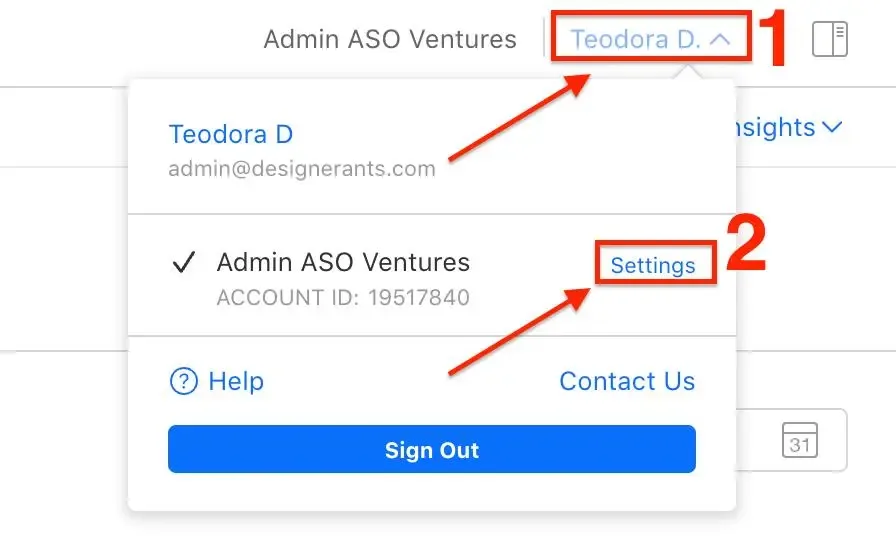
- Click the User Management menu
- Click the blue Invite Users button
- Fill out the form with the following information:
- First name: Teodora
- Last name: Dobre
- Email: teo@designerants.com
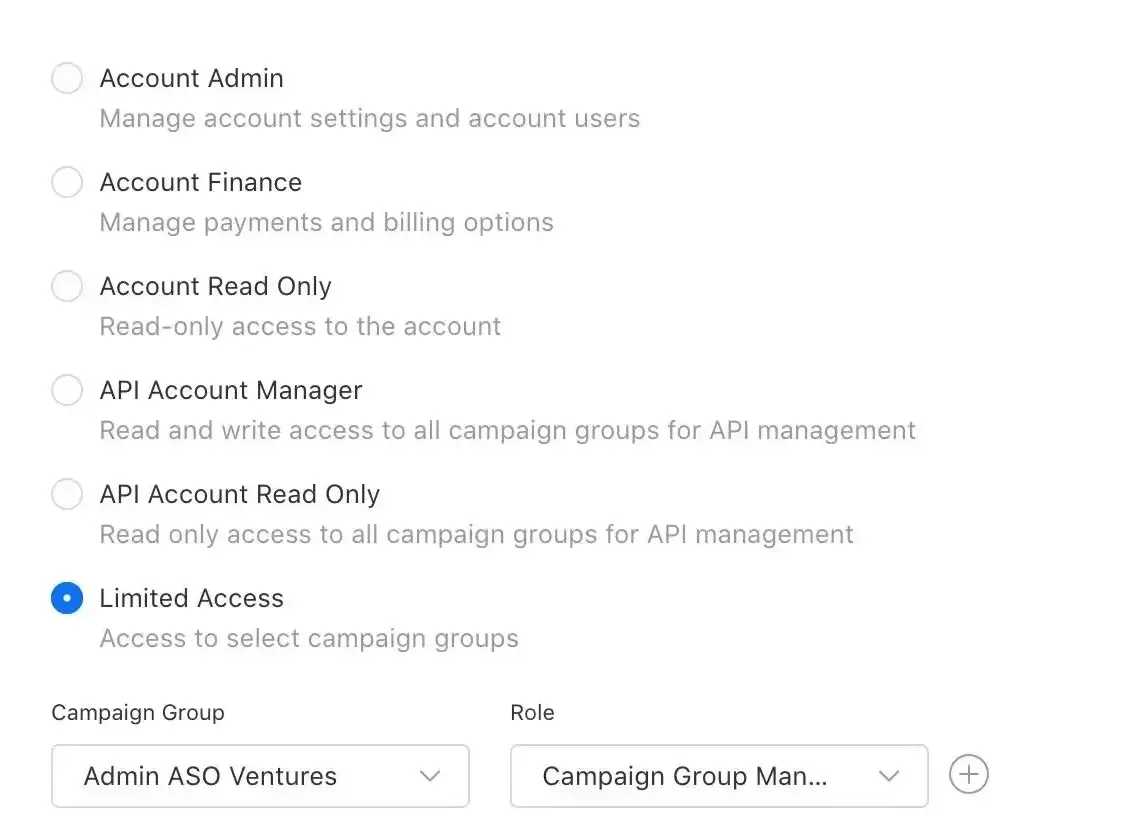
- User access and role:
- Select Limited Access
- Select your Campaign Group
- Add the Campaign Group Manager role
3. Design Files
Grant access to your Figma design files as "Editor" with the email teo@designerants.com
4. Contact & Support
If you have any questions or need help during the setup process, contact:
5. FAQ
Why do I use designerants.com domain for most access requests?
designerants.com is my previous brand domain that I still actively use for platform access and account management. I plan to migrate everything to the newer domain later this year.
Free starter guide
Ship your first Apple Ads campaign in 2 hours.
Most guides make Apple Search Ads sound like a project. It's not. This is the exact setup I use with every new client: campaign structure, keyword match types, starting budget. Two hours, start to finish, no agency jargon.
One email. Unsubscribe anytime.
Keep reading
How do I connect a Meta pixel to my ad account?
How to fix the Meta Ads error: Your ad account needs access to this pixel.
I can't add a Payment method to my Meta Ad account and it was blocked [Solved]
How to fix a blocked Meta Ad account by adding and assigning a valid payment method.
How to Give Access to Add a Payment Method to Your Meta Ad Account
A simple guide to granting the right Meta Business permissions for billing and payment access.
What Does 'Ads Off' Mean in Meta Ads?
A simple guide to understanding the 'Ads Off' status and restoring ad delivery in Meta Ads Manager.